
外观
上下文工程实战:构建深度研究智能体
要通过上下文工程构建可靠的智能体,需要大量迭代和审慎的设计决策。本指南以一个基础深度研究智能体为例,深入介绍上下文工程的实际工作,以及改善可靠性和表现的方法与设计模式。
原文课程信息
本文基于《使用 n8n 构建有效的 AI 智能体》,提供智能体系统设计与实现方法、可下载模板、提示词和进阶技巧。
上下文工程的实际工作
有效的智能体需要反复调整系统提示词和工具定义。开发过程中,往往要花费数小时迭代以下内容:
- 系统提示词的设计与改进。
- 工具定义及使用说明。
- 智能体架构和通信方式。
- 智能体之间的输入与输出规范。
不要低估这项工作。上下文工程不是一次性任务,而是对可靠性和表现有显著影响的持续迭代过程。
智能体架构设计
初始设计的问题
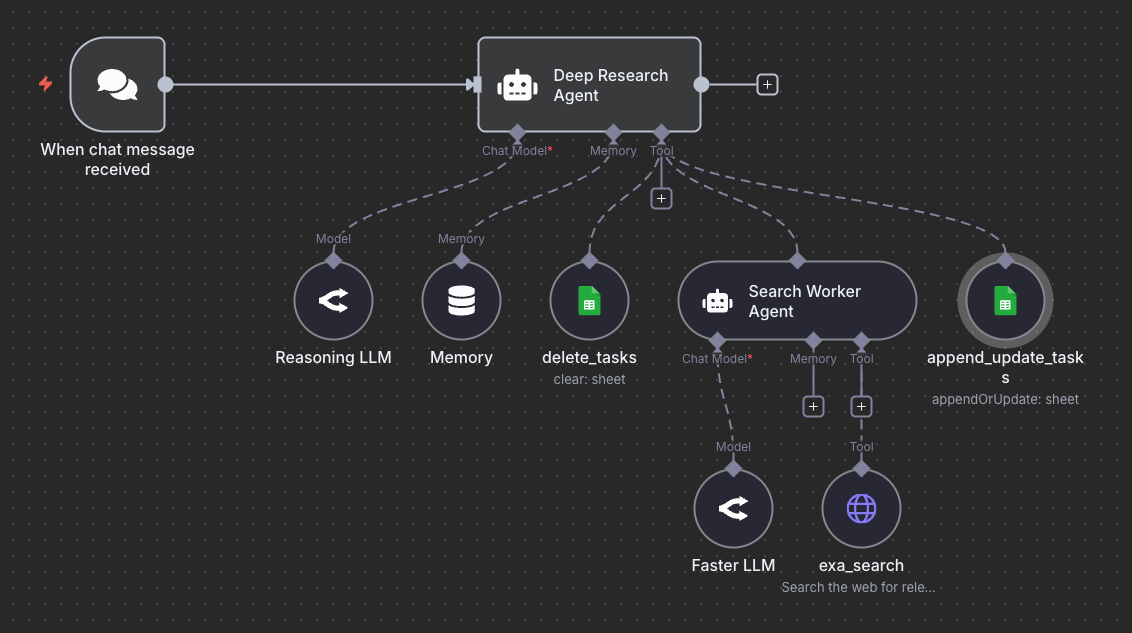
初始架构直接把网页搜索工具连接到深度研究智能体。这给单个智能体增加了过多职责:管理任务(创建、更新、删除)、保存记忆、执行网页搜索,以及生成最终报告。
这一设计产生的问题:
- 上下文越来越长。
- 智能体忘记执行搜索。
- 任务完成后漏掉状态更新。
- 面对不同查询时表现不稳定。
改进后的多智能体架构
解决方法是分离职责,引入专门的搜索执行智能体。
- 职责分离:父智能体负责规划与编排,搜索执行智能体只负责网页搜索。
- 提高可靠性:每个智能体的职责清楚且集中,减少漏做任务或遗忘操作的情况。
- 灵活选择模型:不同智能体可使用适合自身任务的模型。原文方案用 Gemini 2.5 Pro 进行复杂规划与推理,用 Gemini 2.5 Flash 以更低成本、更快速度执行搜索。
如果采用 OpenAI 等其他提供商的模型,原文建议使用 GPT-5 负责规划推理、GPT-5-mini 负责搜索执行,以获得类似效果。
设计原则
分离智能体职责能改善可靠性,也便于为不同子任务选择成本合适的模型。
系统提示词设计
下面是原作者在 n8n 中构建的深度研究智能体完整系统提示词:
md
You are a deep research agent who will help with planning and executing search tasks to generate a deep research report.

## GENERAL INSTRUCTIONS

The user will provide a query, and you will convert that query into a search plan with multiple search tasks (3 web searches). You will execute each search task and maintain the status of those searches in a spreadsheet.

You will then generate a final deep research report for the user.

For context, today's date is: {{ $now.format('yyyy-MM-dd') }}

## TOOL DESCRIPTIONS

Below are some useful instructions for how to use the available tools.

Deleting tasks: Use the delete_task tool to clear up all the tasks before starting the search plan.

Planning tasks: You will create a plan with the search tasks (3 web searches) and add them to the Google Sheet using the append_update_task tool. Make sure to keep the status of each task updated after completing each search. Each task begins with a todo status and will be updated to a "done" status once the search worker returns information regarding the search task.

Executing tasks: Use the Search Worker Agent tool to execute the search plan. The input to the agent are the actual search queries, word for word.

Use the tools in the order that makes the most sense to you but be efficient.
接下来拆解各部分,解释它们的作用。
定义智能体的总体角色
系统提示词开头清楚说明智能体的角色:
md
You are a deep research agent who will help with planning and executing search tasks to generate a deep research report.一般指令
明确规定智能体的工作流程:
md
## GENERAL INSTRUCTIONS

The user will provide a query, and you will convert that query into a search plan with multiple search tasks (3 web searches). You will execute each search task and maintain the status of those searches in a spreadsheet.

You will then generate a final deep research report for the user.
提供必要上下文
当前日期信息:
研究智能体要获取最新信息,就需要知道当前日期:
md
For context, today's date is: {{ $now.format('yyyy-MM-dd') }}这很重要,因为模型的知识截止日期可能比实际日期早数月甚至数年。如果没有当前日期,智能体往往会搜索过时资料。日期上下文能帮助它理解“最新新闻”“近期进展”等查询的时间含义。
在 n8n 中,可以通过内置函数动态注入当前日期,并设置为仅日期、日期与时间或特定时区等格式。
工具定义与使用说明
详细描述工具的重要性
工具定义通常出现在两个地方:系统提示词中说明功能和使用时机;实际工具实现中则定义技术规范和参数。
关键理解
明显的性能改善,往往来自在系统提示词中清楚解释工具使用方式,而不只是定义参数。
工具使用说明示例
系统提示词还包括各个可用工具的详细使用说明:
md
## TOOL DESCRIPTIONS

Below are some useful instructions for how to use the available tools.

Deleting tasks: Use the delete_task tool to clear up all the tasks before starting the search plan.

Planning tasks: You will create a plan with the search tasks (3 web searches) and add them to the Google Sheet using the append_update_task tool. Make sure to keep the status of each task updated after completing each search. Each task begins with a todo status and will be updated to a "done" status once the search worker returns information regarding the search task.

Executing tasks: Use the Search Worker Agent tool to execute the search plan. The input to the agent are the actual search queries, word for word.

Use the tools in the order that makes the most sense to you but be efficient.
最初没有明确规定状态值时,智能体在不同运行中会使用不同表示。例如,待办有时写 pending,有时写 to-do;完成有时写 completed、done 或 finished。
应明确限定允许的值,消除歧义,保持行为一致。
系统提示词还包含以下指令:
md
Use the tools in the order that makes most sense to you, but be efficient.这一选择给了智能体优化执行策略的空间。在测试中,它可能认为两次搜索已经足够,从而只执行原计划三次中的两次;也可能合并重复查询,或跳过高度重叠的搜索。
如果要求执行全部搜索任务,可以改用下面的明确指令:
md
You MUST execute a web search for each and every search task you create.
Do NOT skip any tasks, even if they seem redundant.灵活方式适合开发与测试阶段,以观察智能体的决策模式;严格方式适合高度重视一致性与完整性的生产环境。
上下文工程的迭代过程
持续改进上下文
开发过程通常包括:
- 使用基础系统提示词完成初始实现。
- 用多种查询进行测试。
- 找出遗漏任务、错误状态值、搜索不完整等问题。
- 针对每个问题补充具体指令。
- 重新测试,验证改进。
- 重复这一循环。
仍然可以改进的地方
即便多次迭代,仍有进一步优化的空间。
搜索任务元数据:
- 增强搜索查询。
- 指明搜索类型:网页、新闻、学术或 PDF。
- 设置时间筛选:今天、过去一周、一个月、一年或不限时间。
- 指明技术、科学、健康等领域。
- 设置执行优先级。
搜索规划:
- 详细解释如何生成搜索任务。
- 规定推荐的查询格式。
- 指导复杂问题的拆解。
- 提供合理与不合理的任务拆解示例。
日期范围:
- 为限时搜索指定起止日期。
- 规定日期参数格式。
- 说明如何从时间关键词推断日期范围。
这些改进方向表明,为智能体实现网页搜索并不简单,需要大量上下文工程工作。
进阶考虑
子智能体通信
设计多智能体系统时,要认真决定传递哪些信息。
**子智能体需要什么?**对于搜索执行智能体,通常只需要查询文本,不必传入完整上下文或全部任务元数据。输入应尽量少且聚焦。
**子智能体应该返回什么?**应包含搜索结果与相关发现、错误状态或失败条件,以及执行过程的元数据。
管理上下文长度
随着任务推进,任务历史、搜索结果和对话内容会不断累积,占用更多词元。
管理方法包括:
- 使用独立智能体隔离上下文。
- 提供记忆管理工具。
- 对较长输出先做摘要,再加入上下文。
- 在不同研究查询之间清理任务列表。
在系统提示词中处理错误
应为失败场景加入相应指令:
text
ERROR HANDLING:
- If search_worker fails, retry once with rephrased query
- If task cannot be completed, mark status as "failed" with reason
- If critical errors occur, notify user and request guidance
- Never proceed silently when operations fail
结论
构建可靠智能体的上下文工程需要:花时间反复调整提示词和工具定义;谨慎决定智能体的分工与通信;使用明确指令消除隐含假设;根据实际行为持续改进;平衡灵活性与控制。
深度研究智能体的例子展示了,合理的上下文工程如何让不稳定的原型变得更稳健,并为生产应用做好准备。清晰的角色、明确的工具说明、必要的上下文和持续迭代,有助于智能体稳定地产出高质量结果。
原文课程信息
查看包含实操示例与模板的完整课程。原文优惠码 PROMPTING20 可额外优惠 20%,有效性以课程方说明为准。