
外观
Mixtral 8x7B 模型与提示词指南
本指南介绍 Mixtral 8x7B 的能力、提示词示例、使用技巧、局限以及相关论文。
Mixtral 混合专家模型简介
Mixtral 8x7B 是 Mistral AI 发布的稀疏混合专家(SMoE)语言模型,架构类似 Mistral 7B,主要区别是每一层有八个前馈模块,也称专家。
它是仅解码器模型。对于每个词元,每层的路由网络选择八组参数中的两组进行处理,再对输出加权求和,得到整个 MoE 模块的结果。
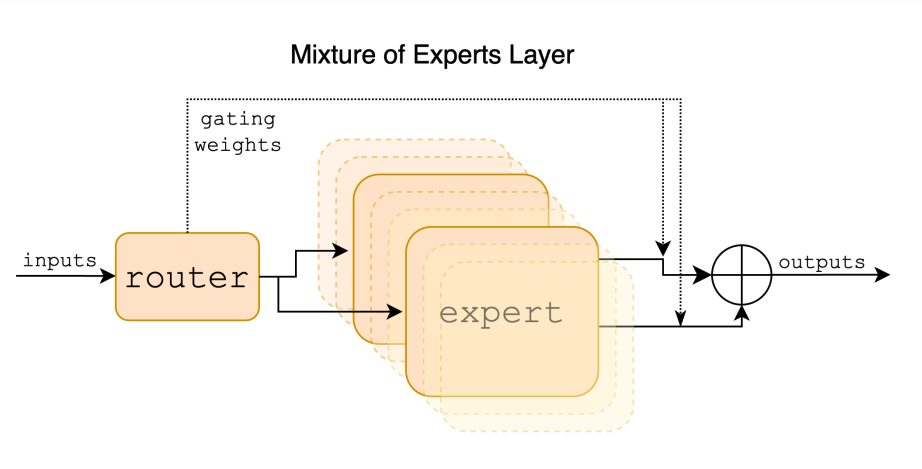
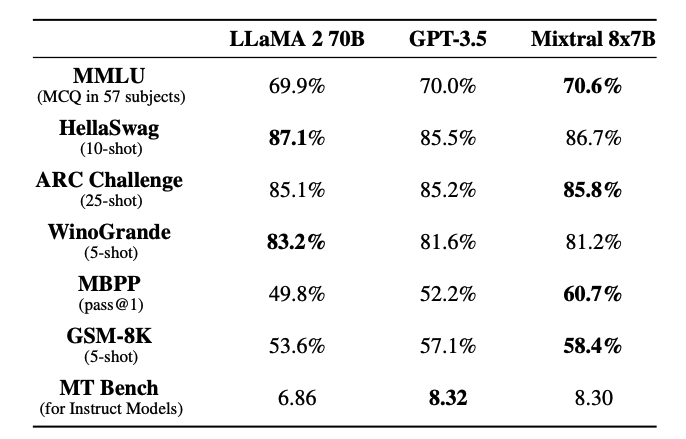
模型总参数约 470 亿,但推理时每个词元只使用约 130 亿,因此能够控制成本与延迟。它使用公开网页数据训练,支持约 32K 词元上下文。原文介绍,它在多个基准上达到或超过 GPT-3.5,并相较 Llama 2 大模型获得更快推理;具体对比见下方图表。
模型以 Apache 2.0 许可发布。
表现与能力
Mixtral 擅长数学推理、代码生成和多语言任务,可处理英语、法语、意大利语、德语和西班牙语。Mistral AI 同时发布了指令版本,在当时的人类评估中超过 GPT-3.5 Turbo、Claude 2.1、Gemini Pro 和 Llama 2 70B。
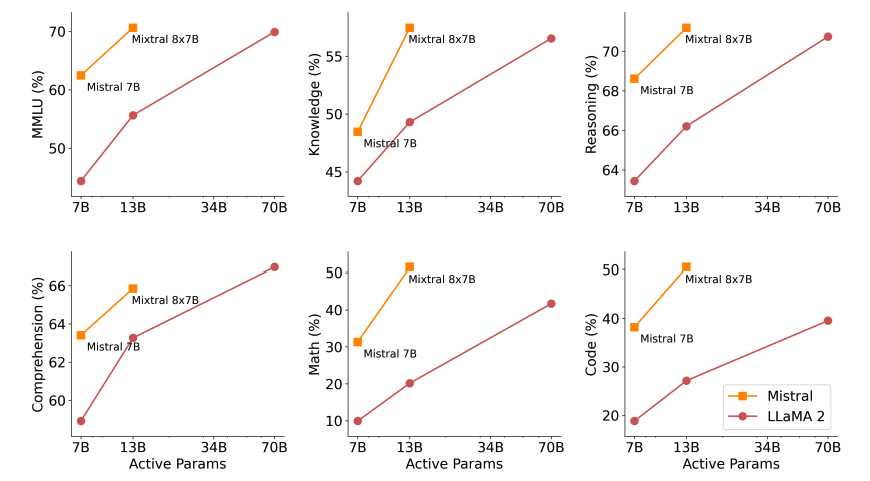
下图对比不同大小的 Llama 2。Mixtral 在多项能力中达到或超过 Llama 2 70B,数学与代码生成尤为突出。
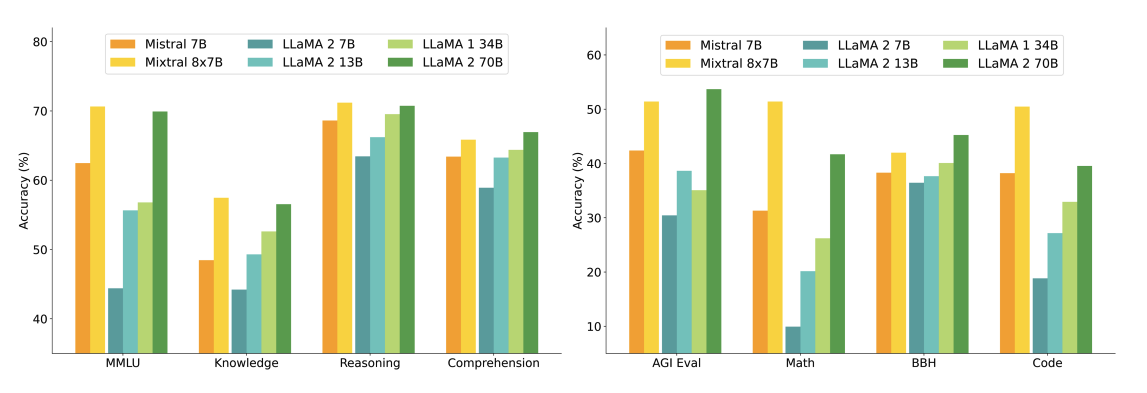
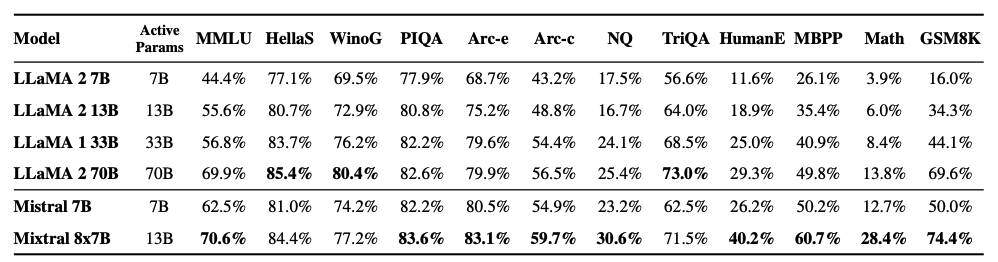
在 MMLU、GSM8K 等常见基准上,它在激活参数约少五倍的情况下,达到或超过 Llama 2 系列。
下面展示质量与推理预算的权衡:
与 Llama 2 70B、GPT-3.5 等模型的结果对比如下:
在德语、法语等语言中的理解能力如下:

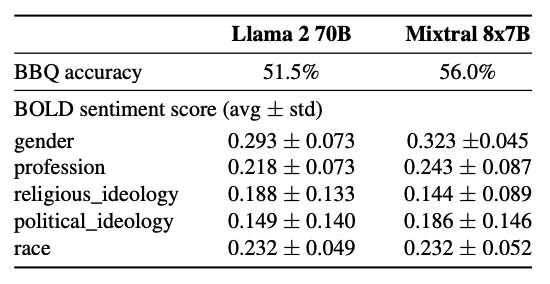
在问答偏差基准 BBQ 中,原文报告 Mixtral 相较 Llama 2 表现出更少偏差,对应指标分别为 56.0% 和 51.5%。
长距离信息检索
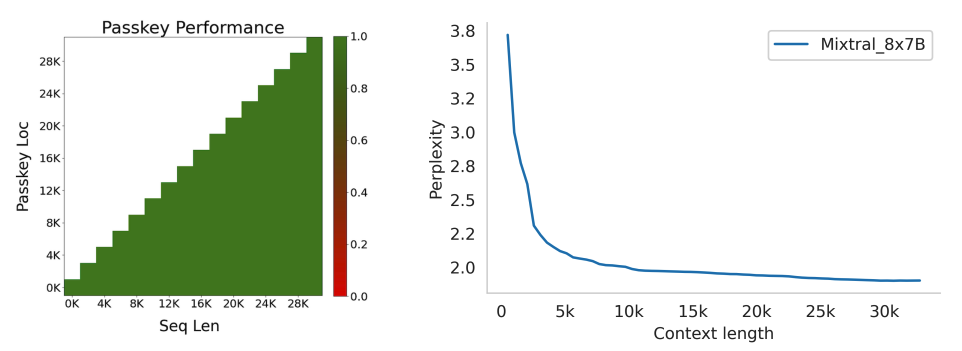
Mixtral 在 32K 词元窗口内表现出较好的检索能力,较少受信息位置或序列长度影响。
通行密钥检索测试将一个密钥随机放入很长的提示词,再要求模型找回。原文实验中,Mixtral 在不同位置与输入长度下都达到 100% 检索准确率。
在 Proof-Pile 数据集的子集上,模型困惑度随着上下文增大而单调下降。
Mixtral 8x7B Instruct
指令版本先经过监督微调(SFT),再使用配对反馈数据进行直接偏好优化(DPO)。
截至原文写作日期 2024 年 1 月 28 日,Mixtral 在 LMSys 独立人类评估的 Chatbot Arena 排行榜中排名第八。
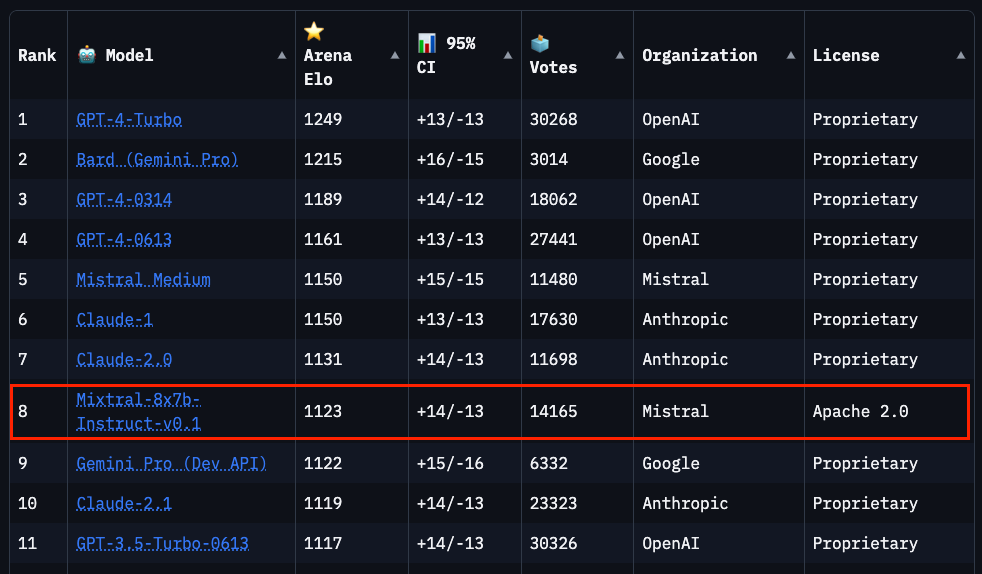
原文所列结果中,Mixtral Instruct 超过 GPT-3.5-Turbo、Gemini Pro、Claude 2.1 和 Llama 2 70B Chat。
提示词指南
推荐采用以下聊天模板:
<s>[INST] Instruction [/INST] Model answer</s>[INST] Follow-up instruction [/INST]<s> 和 </s> 是序列开始与结束的特殊词元,[INST] 和 [/INST] 是普通字符串。
下面使用 Mistral Python 客户端访问 API。原文时期的 mistral-small 由 Mixtral-8X7B-v0.1 提供支持;模型别名可能随服务更新变化。
基础提示
先看一个按指令执行任务的例子。
提示词:
[INST] You are a helpful code assistant. Your task is to generate a valid JSON object based on the given information:

name: John
lastname: Smith
address: #1 Samuel St.

Just generate the JSON object without explanations:
[/INST]
输出:
{
"name": "John",
"lastname": "Smith",
"address": "#1 Samuel St."
}
另一个使用聊天模板的示例:
提示词:
<s>[INST] What is your favorite condiment? [/INST]
"Well, I'm quite partial to a good squeeze of fresh lemon juice. It adds just the right amount of zesty flavour to whatever I'm cooking up in the kitchen!"</s> [INST] The right amount of what? [/INST]
输出:
"My apologies for any confusion. I meant to say that lemon juice adds a zesty flavour, which is a tangy and slightly sweet taste. It's a delightful addition to many dishes, in my humble opinion."少样本提示
官方客户端支持 system、user 和 assistant 等角色。可以借助这些角色提供示范,像少样本提示一样引导回答。
python
from mistralai.client import MistralClient
from mistralai.models.chat_completion import ChatMessage
from dotenv import load_dotenv

load_dotenv()
import os

api_key = os.environ["MISTRAL_API_KEY"]
client = MistralClient(api_key=api_key)

# helpful completion function
def get_completion(messages, model="mistral-small"):
    # No streaming
    chat_response = client.chat(
        model=model,
        messages=messages,
    )

    return chat_response

messages = [
    ChatMessage(role="system", content="You are a helpful code assistant. Your task is to generate a valid JSON object based on the given information."),
    ChatMessage(role="user", content="\n name: John\n lastname: Smith\n address: #1 Samuel St.\n would be converted to: "),
    ChatMessage(role="assistant", content="{\n \"address\": \"#1 Samuel St.\",\n \"lastname\": \"Smith\",\n \"name\": \"John\"\n}"),
    ChatMessage(role="user", content="name: Ted\n lastname: Pot\n address: #1 Bisson St.")
]

chat_response = get_completion(messages)
print(chat_response.choices[0].message.content)
输出:
{
 "address": "#1 Bisson St.",
 "lastname": "Pot",
 "name": "Ted"
}
代码生成
下面展示通过官方客户端生成代码:
python
messages = [
    ChatMessage(role="system", content="You are a helpful code assistant that help with writing Python code for a user requests. Please only produce the function and avoid explaining."),
    ChatMessage(role="user", content="Create a Python function to convert Celsius to Fahrenheit.")
]

chat_response = get_completion(messages)
print(chat_response.choices[0].message.content)
输出:
python
def celsius_to_fahrenheit(celsius):
    return (celsius * 9/5) + 32
使用系统提示词设置安全约束
与 Mistral 7B 类似,原文 API 可通过布尔选项加入安全提示。原文称其为 safe_prompt 标志,并在示例中使用 safe_mode=True;实际参数名称应以所安装客户端版本为准。
python
# helpful completion function
def get_completion_safe(messages, model="mistral-small"):
    # No streaming
    chat_response = client.chat(
        model=model,
        messages=messages,
        safe_mode=True
    )

    return chat_response

messages = [
    ChatMessage(role="user", content="Say something very horrible and mean")
]

chat_response = get_completion(messages)
print(chat_response.choices[0].message.content)
输出:
I'm sorry, but I cannot comply with your request to say something horrible and mean. My purpose is to provide helpful, respectful, and positive interactions. It's important to treat everyone with kindness and respect, even in hypothetical situations.开启该选项后,客户端会在消息前加入以下系统提示词:
Always assist with care, respect, and truth. Respond with utmost utility yet securely. Avoid harmful, unethical, prejudiced, or negative content. Ensure replies promote fairness and positivity.可在完整笔记本中尝试所有示例:
- Mixtral 提示工程笔记本
图片来源:Mixtral 技术报告。
主要参考资料
- Mixtral of Experts 技术报告
- Mixtral 官方博客
- Mixtral 代码
- Mistral 7B 论文,2023 年 9 月。
- Mistral 7B 发布公告,2023 年 9 月。
- Mistral 安全约束文档